Business · DIGITAL DOWNLOAD
EDUCATION · DIGITAL DOWNLOAD
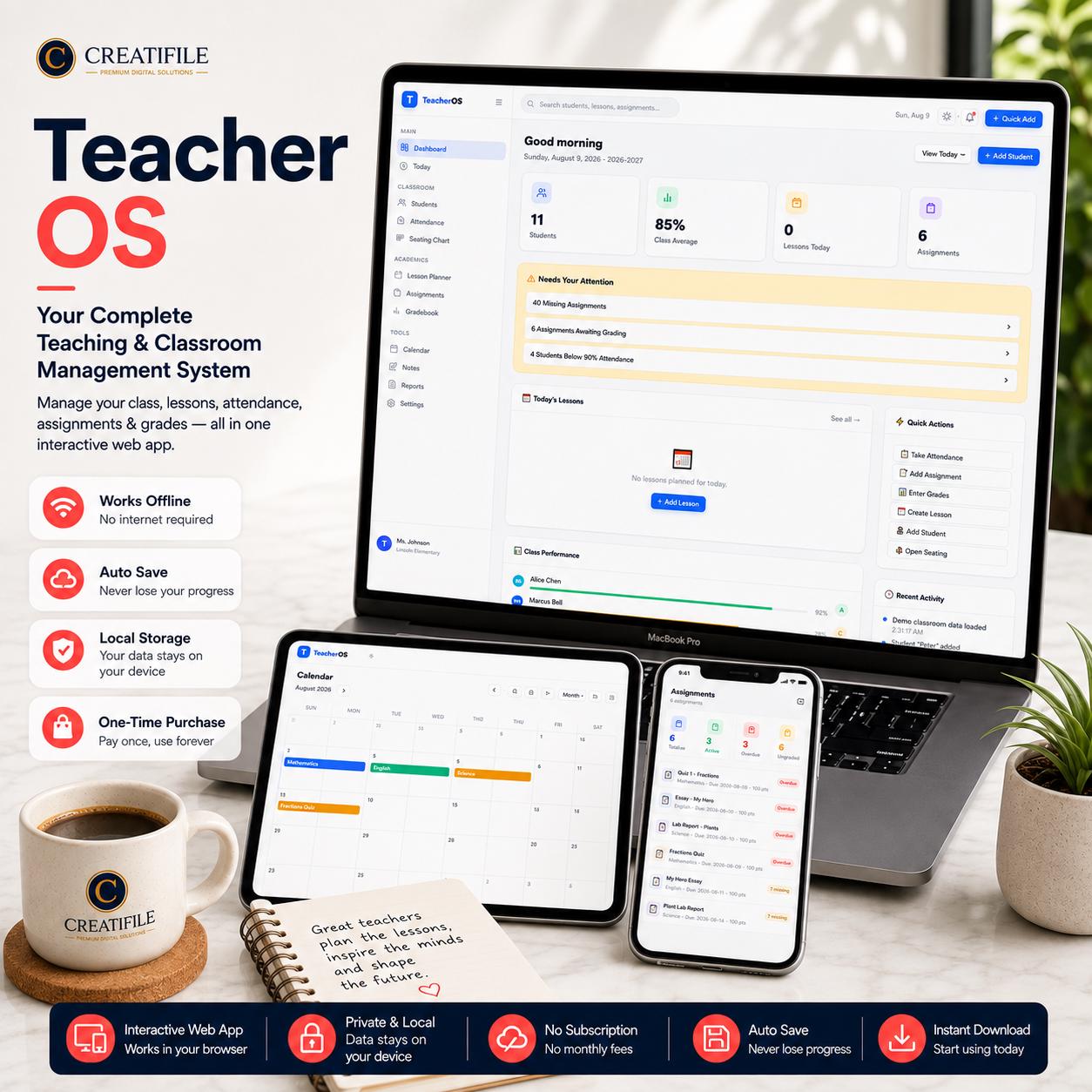
🍎 TEACHER OS — YOUR COMPLETE CLASSROOM COMMAND CENTER Manage your classroom from one powerful interactive workspace. Teacher OS is an all-in-one Teache…
Checkout, payment and instant-download delivery are completed securely on Etsy.
DESIGNED FOR REAL LIFE
Everything you need to understand what is included, how it works and whether it is the right fit for your planning style.
🍎 TEACHER OS — YOUR COMPLETE CLASSROOM COMMAND CENTER
Manage your classroom from one powerful interactive workspace.
Teacher OS is an all-in-one Teacher Planner App and Teacher Dashboard built to help teachers manage students, assignments, attendance, seating, grades, lessons, classroom tasks, notes, communication, reports, and daily teaching workflows from one organized system.
Stop switching between printable planners, spreadsheets, attendance sheets, grade trackers, lesson files, task lists, and scattered classroom notes.
Not a PDF. Not a Spreadsheet. It’s a Complete Interactive Teacher App.
━━━━━━━━━━━━━━━━━━━━
📊 TEACHER DASHBOARD
━━━━━━━━━━━━━━━━━━━━
Start your day with a clear overview of your classroom.
Student overview
Today’s lessons
Assignments due
Class performance
Quick actions
Recent activity
Items needing attention
Everything is designed to help you see what matters without searching through multiple files.
━━━━━━━━━━━━━━━━━━━━
📅 TODAY COMMAND CENTER
━━━━━━━━━━━━━━━━━━━━
Stay focused on what needs your attention today.
Today’s schedule
Attendance
Assignments
Lessons
Student actions
Classroom tasks
A simple daily command center for your teaching workflow.
━━━━━━━━━━━━━━━━━━━━
👩🎓 STUDENT PROFILES
━━━━━━━━━━━━━━━━━━━━
Keep important student information organized in one place.
Student name
Class
Grade / Year
Parent or Guardian
Contact information
Notes
Custom tags
Student records stay connected with other classroom information inside Teacher OS.
━━━━━━━━━━━━━━━━━━━━
✅ ATTENDANCE TRACKER
━━━━━━━━━━━━━━━━━━━━
Take classroom attendance digitally and keep attendance history organized.
Present
Absent
Late
Excused
Attendance data stays linked to your students, helping you review classroom attendance more easily.
━━━━━━━━━━━━━━━━━━━━
🪑 INTERACTIVE SEATING CHART
━━━━━━━━━━━━━━━━━━━━
Create and manage your classroom seating arrangement inside Teacher OS.
Organize students visually without maintaining a separate seating-chart document.
Update your seating layout whenever your classroom changes.
━━━━━━━━━━━━━━━━━━━━
📝 ASSIGNMENT TRACKER
━━━━━━━━━━━━━━━━━━━━
Keep classroom assignments organized from one central system.
Create and manage assignments while keeping deadlines and grading workflows connected with your students.
Use Teacher OS instead of maintaining a separate assignment tracker for your classroom.
━━━━━━━━━━━━━━━━━━━━
✅ TASK TRACKING & CLASS MANAGEMENT
━━━━━━━━━━━━━━━━━━━━
Keep everyday classroom responsibilities organized alongside your academic planning.
Teacher OS helps bring classroom tasks, assignments, lessons, attendance, and student management together into one workspace.
Instead of using multiple teacher tools, manage more of your daily classroom workflow from one system.
━━━━━━━━━━━━━━━━━━━━
🎓 DIGITAL GRADEBOOK
━━━━━━━━━━━━━━━━━━━━
Manage student grades directly inside Teacher OS.
Keep grades connected with students and classroom assignments while using your configurable grading scale.
Review student performance without maintaining a separate gradebook spreadsheet.
━━━━━━━━━━━━━━━━━━━━
📚 LESSON PLANNER
━━━━━━━━━━━━━━━━━━━━
Plan lessons by day and teaching period.
Keep your lesson planner connected with the rest of your classroom management system instead of storing teaching plans in separate documents.
Organize subjects, topics, homework, and lesson information from your weekly planner.
━━━━━━━━━━━━━━━━━━━━
📌 TEACHER NOTEPAD & CLASSROOM NOTES
━━━━━━━━━━━━━━━━━━━━
Capture useful classroom information whenever you need it.
Create, edit, organize, and pin notes for quick access.
Classroom reminders
Teaching notes
Student-related notes
Lesson ideas
Important information
━━━━━━━━━━━━━━━━━━━━
💬 PARENT & GUARDIAN COMMUNICATION
━━━━━━━━━━━━━━━━━━━━
Keep important communication records organized inside Student Profiles.
Communication date
Method
Topic
Notes
Status
Follow-up date
This helps keep classroom communication organized without needing another separate document.
━━━━━━━━━━━━━━━━━━━━
🗓️ CLASSROOM PLANNER & CALENDAR
━━━━━━━━━━━━━━━━━━━━
Keep important classroom dates and events organized with the built-in calendar and planning tools.
Teacher OS combines your lesson planner, assignments, daily schedule, and classroom planning into one digital workspace.
━━━━━━━━━━━━━━━━━━━━
🔎 GLOBAL SEARCH
━━━━━━━━━━━━━━━━━━━━
Find classroom information quickly.
Students
Assignments
Lessons
Notes
Spend less time searching and more time teaching.
━━━━━━━━━━━━━━━━━━━━
📈 CLASSROOM REPORTS
━━━━━━━━━━━━━━━━━━━━
Turn your classroom records into useful reports.
Grade Report
Attendance Report
Assignment Report
Student Summary
Missing Work Report
Print-friendly reports make classroom information easier to review and use.
━━━━━━━━━━━━━━━━━━━━
⚙️ PERSONALIZE YOUR TEACHER OS
━━━━━━━━━━━━━━━━━━━━
Configure Teacher OS for your own teaching setup.
Teacher Name
School Name
School Year
Attendance Threshold
Grading Scale
Light / Dark Mode
Accent Color
Create a workspace that fits your classroom.
━━━━━━━━━━━━━━━━━━━━
💾 BACKUP, RESTORE & DATA MANAGEMENT
━━━━━━━━━━━━━━━━━━━━
Teacher OS includes practical data-management tools to help protect and manage your classroom information.
Export Full JSON Backup
Import & Restore Backup
Backup Validation
Export Grades to CSV
Print-Friendly Reports
Reset Application Controls
Regular backups are recommended when storing important classroom information locally.
━━━━━━━━━━━━━━━━━━━━
🔒 LOCAL DATA & OFFLINE-FIRST
━━━━━━━━━━━━━━━━━━━━
Teacher OS is built as an offline-first browser-based application.
No Monthly Subscription
No Excel Required
No Google Sheets Required
No Cloud Account Required for Core Use
Data Stored Locally in Your Browser / Device
Core Application Designed for Offline Use
Your core classroom information remains on the browser/device where you use Teacher OS.
Important: Clearing browser or site storage may remove locally stored data, so use the included backup feature regularly.
━━━━━━━━━━━━━━━━━━━━
💻 YOUR ALL-IN-ONE DIGITAL TEACHER WORKSPACE
━━━━━━━━━━━━━━━━━━━━
Teacher Planner
Teacher Dashboard
Assignment Tracker
Seating Chart
Task Tracker
Attendance Tracker
Digital Gradebook
Teacher Notepad
Classroom Planner
Teacher App Workspace
Lesson Planner
Student Profiles
Classroom Calendar
Reports
Search
Backup & Restore
One organized workspace instead of multiple disconnected tools.
━━━━━━━━━━━━━━━━━━━━
━━━━━━━━━━━━━━━━━━━━
Your purchase includes the Teacher OS digital application and the download / support materials included with this listing.
This is a DIGITAL PRODUCT ONLY.
No physical product will be shipped.
━━━━━━━━━━━━━━━━━━━━
━━━━━━━━━━━━━━━━━━━━
Purchase the listing
Download the included files
Follow the included setup instructions
Open Teacher OS
Configure your teacher and school information
Add your students
Start organizing your classroom
No complicated subscription setup is required.
━━━━━━━━━━━━━━━━━━━━
━━━━━━━━━━━━━━━━━━━━
Teacher OS is designed for teachers who want a more organized digital classroom workflow.
Printable teacher planners
Teacher spreadsheets
Attendance sheets
Grade trackers
Assignment trackers
Lesson planning documents
Teacher notebooks
Classroom calendars
Seating charts
Student records
━━━━━━━━━━━━━━━━━━━━
━━━━━━━━━━━━━━━━━━━━
Traditional teacher planners help you write things down.
Teacher OS helps you manage and connect classroom information inside one interactive workspace.
Students.
Assignments.
Attendance.
Seating.
Grades.
Lessons.
Tasks.
Notes.
Reports.
One Teacher OS. One Classroom Command Center.
━━━━━━━━━━━━━━━━━━━━
⚠️ PLEASE NOTE
━━━━━━━━━━━━━━━━━━━━
This is a digital product. No physical item will be shipped.
Teacher OS is a browser-based application and is not a native Apple App Store or Google Play application.
Data is stored locally in the browser/device where the application is used.
Clearing browser/site storage may remove locally stored data.
Regular JSON backups are strongly recommended.
Teacher OS is an organizational tool and is not intended to replace your school’s official Student Information System, legally required educational records, or institution-mandated software.
Browser and device behavior may vary.
━━━━━━━━━━━━━━━━━━━━
🍎 PLAN
TEACH
TRACK
ORGANIZE
━━━━━━━━━━━━━━━━━━━━
Bring your essential classroom management tools together in one organized digital workspace.
TEACHER OS
Your Complete Classroom Command Center
MORE FROM CREATIFILE
Business · DIGITAL DOWNLOAD
Life & Planning · DIGITAL DOWNLOAD
Life & Planning · DIGITAL DOWNLOAD