Business · DIGITAL DOWNLOAD
EDUCATION · DIGITAL DOWNLOAD
SCHOOL SOCIAL WORKER PLANNER + INTERACTIVE CASELOAD TRACKER Keep students, sessions, follow-ups, goals, tasks, contacts and reports organized in one int…
Checkout, payment and instant-download delivery are completed securely on Etsy.
DESIGNED FOR REAL LIFE
Everything you need to understand what is included, how it works and whether it is the right fit for your planning style.
SCHOOL SOCIAL WORKER PLANNER + INTERACTIVE CASELOAD TRACKER
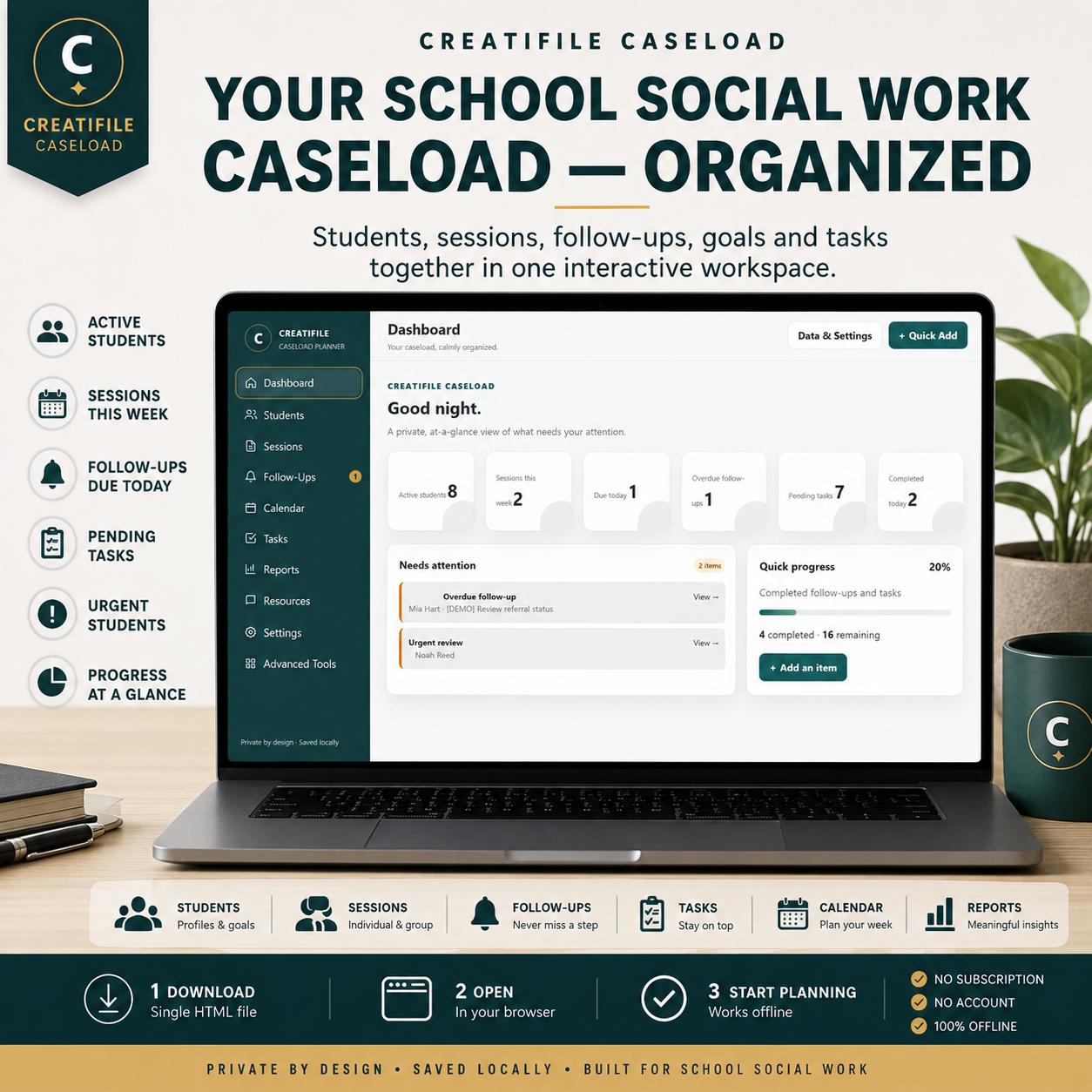
Keep students, sessions, follow-ups, goals, tasks, contacts and reports organized in one interactive workspace built for school social work.
CREATIFILE CASELOAD is an interactive, offline browser-based School Social Worker Planner delivered as a self-contained HTML file.
Not a PDF. Not a spreadsheet. No subscription.
Download the file, open it in a modern browser and start planning.
TRY THE LIVE DEMO
https://creatifile-caseload-view-only-demo.vercel.app/
The online demo is view-only and uses fictional sample data. You can explore the planner interface and features before purchasing. Adding, editing, saving, importing, exporting and personalization are available in the full version.
YOUR CASELOAD IN ONE PLACE
Instead of managing separate spreadsheets, paper notes and planning pages, CREATIFILE CASELOAD brings your everyday organizational workflow into one professional workspace.
Student profiles and caseload information
Individual and group sessions
Follow-ups and due dates
Professional tasks
Student goals
Parent, teacher and staff contacts
Calendar events
Daily priorities
Reports and caseload summaries
Professional resources
CASELOAD DASHBOARD
See what needs your attention at a glance.
Active students
Sessions this week
Follow-ups due today
Overdue follow-ups
Pending tasks
Tasks completed today
Urgent students
Students without a recent session
Overall task and follow-up progress
STUDENT & CASELOAD MANAGEMENT
Name or approved identifier
Grade
Teacher / homeroom
Referral reason
Service type
Start date
Goals
Status
Priority
Tags
Notes
Next session date
Search, filter and sort your caseload to quickly find the information you need.
SESSION TRACKING
Keep an organized history of student support sessions.
Individual sessions
Group sessions
Observations
Consultations
Crisis sessions
Check-ins
Session duration
Location
Presenting concerns
Interventions
Student response
Progress toward goals
Attendance
Follow-up needs
Notes
You can also create weekly, biweekly or monthly recurring sessions.
FOLLOW-UP TRACKER
Keep important next steps visible.
Track student, created date, due date, priority, category, description, status, completion date and completion notes. Follow-ups can also be created directly from a session when additional action is needed.
TASK MANAGEMENT
Manage both general and student-linked professional tasks with due dates, priority levels, categories, status tracking, completion tracking, notes and optional student linking. Weekly, biweekly and monthly recurring tasks are supported.
CALENDAR + DAILY AGENDA
View your workload across monthly and weekly calendar layouts. Your calendar brings together sessions, follow-ups, tasks and custom events.
The Advanced Workspace also includes a Daily Agenda showing today’s sessions, follow-ups and tasks plus upcoming items for the next 7 days.
STUDENT GOALS
Create student-linked goals and track progress over time. Record the goal title, target date, progress percentage and intervention plan, then update progress as the school year continues.
CONTACT LOG
Keep professional communication organized with a student-linked contact log for parents / guardians, teachers, school staff and other professional contacts. Record the date, contact person or role, communication method and summary.
GROUP MANAGEMENT
Create reusable student groups and manage group membership. When you log a group session, CREATIFILE
CASELOAD can create linked session records for the current members of that group.
REUSABLE NOTE TEMPLATES
Save commonly used session-note starters for interventions, student responses and progress. Apply a saved template when creating a new session and edit it as needed.
REPORTS + ANALYTICS
Caseload Summary
Student Activity Report
Weekly Summary
Overdue Items Report
Reports can be copied, printed or downloaded as text files.
The Analytics workspace also provides active caseload, total sessions, service hours, urgent-review count, sessions by type, open follow-ups and unfinished tasks.
ADVANCED TOOLS
Daily Agenda
Student Goals Tracker
Contact Log
Group Management
Group Session Logging
Note Templates
Caseload Analytics
Theme Studio
School-Year Archives
CSV Student Import
Local PIN Privacy Screen
Auto-Lock
CSV STUDENT IMPORT
Already have a student list? Import students from a CSV file instead of entering every profile manually. Required columns are first and last. Optional fields include student ID, grade, teacher, service, priority, status and tags. Exact duplicate names are skipped during import.
SCHOOL-YEAR ARCHIVES
Create a frozen snapshot of the current school year’s records while keeping your current working data available. Saved archives can be viewed, exported or deleted.
8 WORKSPACE THEMES
Classic Light
Midnight
System
Coastal Blue
Forest Sage
Quiet Lavender
Warm Terracotta
Professional Slate
Your theme preference saves on your device.
BACKUP & RESTORE
Your working planner data is stored locally in your browser. Create a JSON backup whenever you want and restore a compatible CREATIFILE CASELOAD backup later.
Regular backups are strongly recommended, especially before clearing browser storage, changing browsers or moving to another device.
FICTIONAL DEMO DATA
Load fictional demo records to see how the planner works. Demo records are clearly identified, do not replace your existing records and can be removed separately.
LOCAL PIN + AUTO-LOCK
Set an optional 4–12 digit local PIN and choose an automatic inactivity lock interval. Important: the PIN is a screen-privacy feature designed to deter casual access. It is not encryption and should not be treated as a security or compliance system.
CREATIFILE CASELOAD interactive HTML planner
Customer User Guide
Instant digital download
No physical product will be shipped.
1. DOWNLOAD — Download your digital files after purchase.
2. OPEN — Open the HTML planner file in a modern browser.
3. PLAN — Start adding students and organizing your caseload.
No account or subscription is required.
COMPATIBILITY
Designed for modern web browsers on desktop computers, laptops, tablets and mobile devices. For managing a larger caseload, a desktop or laptop will generally provide the most comfortable workspace.
This is a browser-based HTML application, not a native iOS or Android app.
CREATIFILE CASELOAD stores working planner data locally in the browser on the device you use. Your records are not intentionally sent by the planner to an online account or cloud database. Because browser data can be cleared or lost, use the built-in Backup feature regularly. Backups themselves contain planner information and should be stored appropriately.
PRIVACY & PROFESSIONAL USE NOTICE
CREATIFILE CASELOAD is an organizational planning tool for personal professional use. It is not an official student information system, clinical record, legal document, medical record or compliance platform. The local PIN is not encryption.
Always follow your school, district, employer and applicable data-handling policies when deciding what student information may be entered or stored.
WHO IT’S FOR
School social workers
School social work interns
School-based student-support professionals
School counselors whose workflow fits these features
School-based case-management professionals
THIS PRODUCT IS NOT
✕ A printable planner
✕ A PDF planner
✕ An Excel workbook
✕ A Google Sheets template
✕ A GoodNotes planner
✕ A Notion template
✕ A native mobile app
✕ A subscription service
✕ An official student-record system
FAQ
No. This is a digital-download product with no recurring subscription required.
No. The planner itself is an interactive HTML file that opens in a modern browser.
No account is required for the planner.
The planner is self-contained and designed for normal use without an internet connection after download.
Working data is saved locally in the browser on the device you use.
Yes. Use the built-in JSON Backup and Restore tools.
The interface includes responsive layouts, although desktop/laptop is recommended for heavier caseload management.
No. It is a local privacy screen and auto-lock feature, not encryption.
DIGITAL DOWNLOAD
This listing is for a digital product only. No physical item will be mailed.
Because digital products are delivered electronically, please review the listing details, compatibility information and product images carefully before purchasing. For any order issue, contact us through Etsy so we can help.
MORE FROM CREATIFILE
Business · DIGITAL DOWNLOAD
Life & Planning · DIGITAL DOWNLOAD
Life & Planning · DIGITAL DOWNLOAD