Business · DIGITAL DOWNLOAD
BUSINESS · DIGITAL DOWNLOAD
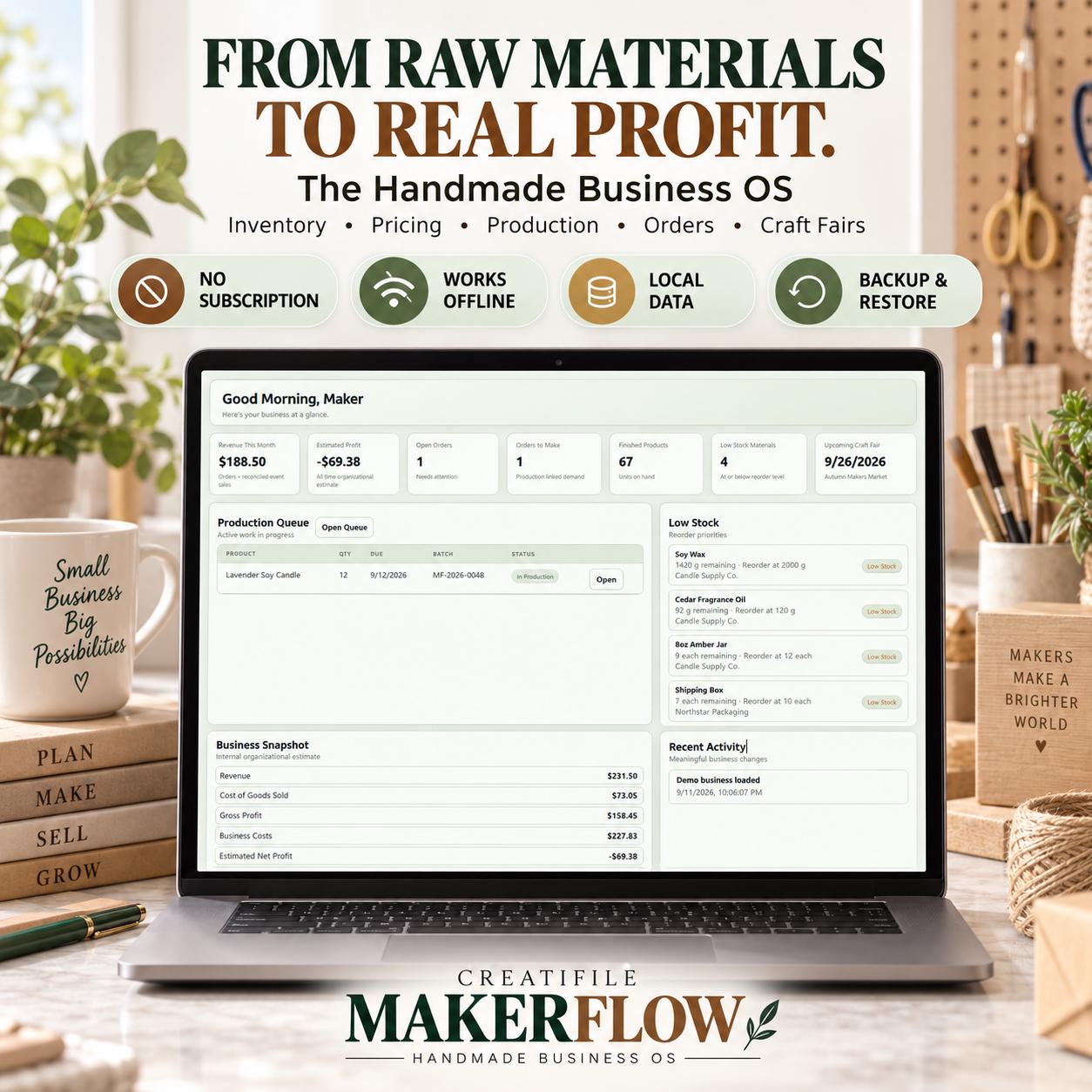
FROM RAW MATERIALS TO REAL PROFIT. Run your handmade business without complicated spreadsheets or monthly subscriptions. CREATIFILE MAKERFLOW is an inte…
Checkout, payment and instant-download delivery are completed securely on Etsy.
DESIGNED FOR REAL LIFE
Everything you need to understand what is included, how it works and whether it is the right fit for your planning style.
FROM RAW MATERIALS TO REAL PROFIT.
Run your handmade business without complicated spreadsheets or monthly subscriptions.
CREATIFILE MAKERFLOW is an interactive Craft Business Planner and Handmade Business App built for makers, crafters and Etsy sellers who want to manage raw materials, product costs, pricing, production, inventory, orders, customers, expenses and craft fairs in one connected workspace.
NOT A PRINTABLE PDF
NOT A SPREADSHEET
NO MAKERFLOW ACCOUNT
NO MONTHLY MAKERFLOW SUBSCRIPTION
WORKS OFFLINE
LOCAL BROWSER DATA
JSON BACKUP & RESTORE
Download it, open it in a compatible modern browser and start organizing your handmade business.
━━━━━━━━━━━━━━━━━━━━
ONE CONNECTED HANDMADE BUSINESS WORKFLOW
━━━━━━━━━━━━━━━━━━━━
A handmade product begins long before the sale.
You buy materials.
You use those materials to make products.
You calculate what each product costs.
You decide what to charge.
You plan production.
You make a batch.
You manage finished inventory.
You sell online or at a craft fair.
Then you need to understand how your business performed.
RAW MATERIALS
→ RECIPES / BOM
→ TRUE PRODUCT COST
→ PRICING
→ PRODUCTION
→ INVENTORY
→ ORDERS
→ CRAFT FAIRS
→ REPORTS
Instead of maintaining separate inventory sheets, pricing calculators, production planners and craft fair trackers, keep your handmade-business records organized in one interactive system.
━━━━━━━━━━━━━━━━━━━━
━━━━━━━━━━━━━━━━━━━━
BUSINESS DASHBOARD
See important business information from one central workspace, including revenue, estimated profit, open orders, production activity, finished products, low-stock materials and upcoming craft fairs.
RAW MATERIAL INVENTORY
Track the materials you purchase and use to make your products.
Organize quantities, units, purchase information, costs, suppliers and stock levels.
PRODUCT INVENTORY
Keep track of finished products and available quantities, with inventory history and low-stock information.
RECIPES / BILL OF MATERIALS
Connect raw materials to the products you make.
Build a Recipe / BOM so MakerFlow can calculate material requirements and costs from the components used in each product.
TRUE PRODUCT COST CALCULATOR
Go beyond material cost.
Materials
Packaging
Labor
Overhead
Additional costs
Use your own business information to understand what each product costs to make.
PRICING CALCULATOR
Explore retail and wholesale pricing using product cost, markup and margin calculations.
Make more informed pricing decisions without maintaining a separate pricing spreadsheet.
ETSY PROFIT CALCULATOR
Estimate how entered Etsy selling costs can affect a sale, including configurable marketplace-related fees and other entered costs.
Compare selling price, costs and estimated profit while planning your pricing.
SKU GENERATOR
Create SKUs to help organize products and inventory.
PRODUCTION QUEUE
Plan upcoming production and keep track of what needs to be made.
BATCH TRACKER
Create and manage production batches.
When an applicable batch is completed, MakerFlow can consume its linked raw materials and add the completed quantity to finished-product inventory.
Production and inventory stay connected.
ORDERS & SALES
Manage multi-item orders across different sales channels.
Track order status, products, customers, marketplace fees, shipping costs and other relevant sales information.
MakerFlow preserves historical cost information used by recorded transactions so later product-cost changes do not simply rewrite past records.
CUSTOMERS
Keep useful customer information organized alongside your orders and sales.
SUPPLIERS
Organize supplier information and connect suppliers with relevant materials and expenses.
EXPENSES
Record and categorize business expenses.
Relevant expenses can also be connected with suppliers or craft fairs.
CRAFT FAIR MANAGEMENT
Plan and track your in-person selling events from one dedicated workspace.
Event details
Products
Inventory
Event sales
Event-related costs
Packing information
Reconciliation
Event performance
Useful for makers who sell both online and at markets, fairs and vendor events.
REPORTS & ANALYTICS
Turn everyday business records into clearer business visibility.
Revenue
Cost of Goods Sold (COGS)
Gross Profit
Operating Expenses
Marketplace Fees
Shipping Costs
Craft Fair Event Costs
Estimated Net Profit
Sales by Channel
Product Performance
Material Spend
Inventory Information
Craft Fair Performance
Production History
Printable reporting tools are also included where supported.
GLOBAL SEARCH
Search across your MakerFlow workspace without manually opening every section.
CSV IMPORT / EXPORT
Use supported CSV tools to move compatible business data in or out of MakerFlow.
ARCHIVES
Move inactive records out of everyday workflows while keeping historical information organized.
THEMES & SETTINGS
Choose from multiple visual themes and customize your MakerFlow workspace.
JSON BACKUP & RESTORE
Export your MakerFlow data to a JSON backup file and restore a compatible backup when needed.
Regular backups are strongly recommended.
━━━━━━━━━━━━━━━━━━━━
NOT A PDF. NOT A SPREADSHEET.
━━━━━━━━━━━━━━━━━━━━
MakerFlow is a self-contained interactive HTML browser application.
✗ Microsoft Excel
✗ Google Sheets
✗ Notion
✗ Canva
✗ A MakerFlow account
✗ A monthly MakerFlow subscription
This is an interactive business workspace — not another printable planner.
━━━━━━━━━━━━━━━━━━━━
━━━━━━━━━━━━━━━━━━━━
1 — DOWNLOAD
Download the files included with your Etsy purchase.
2 — OPEN
Open the MakerFlow HTML application in a compatible modern web browser.
3 — START
Add your materials, products, recipes, pricing, production, orders and other business records.
No complicated MakerFlow installation or account setup is required.
━━━━━━━━━━━━━━━━━━━━
OFFLINE + LOCAL DATA
━━━━━━━━━━━━━━━━━━━━
MakerFlow is designed to run locally in your browser without requiring a MakerFlow server connection.
Your entered app data is stored locally in the browser environment you use rather than being synced to a MakerFlow cloud account.
No MakerFlow login or cloud database is required.
Because browser storage belongs to your particular browser/device environment, regular backups are strongly recommended.
MakerFlow includes JSON Backup & Restore tools so you can maintain your own backup copies.
━━━━━━━━━━━━━━━━━━━━
COMPATIBILITY
━━━━━━━━━━━━━━━━━━━━
MakerFlow is designed for modern desktop and tablet browsers and includes a responsive interface that also supports modern mobile browser layouts.
For larger inventories, recipes, production records and reports, desktop or laptop use provides the most comfortable working experience.
Browser and device behavior can vary.
Please use the LIVE DEMO before purchasing if you are unsure about your setup.
━━━━━━━━━━━━━━━━━━━━
TRY THE LIVE DEMO
━━━━━━━━━━━━━━━━━━━━
See MakerFlow before you buy.
creatifilemakerflowviewonlydemoinde.vercel.app
Explore the interface, navigation and workflow before purchasing.
The online demo is intended for product preview. Your purchased MakerFlow file is used for your own business records.
━━━━━━━━━━━━━━━━━━━━
━━━━━━━━━━━━━━━━━━━━
CREATIFILE MAKERFLOW — Handmade Business OS
Self-contained HTML application
User Guide / Getting Started instructions
Built-in JSON Backup & Restore tools
Built-in CSV tools
Demo data for exploring the system
This is a DIGITAL DOWNLOAD.
No physical item will be shipped.
━━━━━━━━━━━━━━━━━━━━
━━━━━━━━━━━━━━━━━━━━
Etsy sellers
Craft fair vendors
Candle makers
Soap makers
Jewelry makers
Sewists
Resin artists
Pottery businesses
Stationery makers
Gift businesses
Home-fragrance makers
Other handmade-product sellers
━━━━━━━━━━━━━━━━━━━━
FAQ
━━━━━━━━━━━━━━━━━━━━
No. MakerFlow is an interactive browser-based application.
No. MakerFlow does not require Excel or Google Sheets.
No.
No. MakerFlow itself does not require a recurring MakerFlow subscription.
The downloaded application is designed to run locally without a MakerFlow server connection. Internet access may still be required to download your Etsy purchase or access external links such as the live demo.
Your entered data is stored locally in the browser environment you use with MakerFlow. It is not automatically synced to a MakerFlow cloud account.
Yes. MakerFlow includes JSON Backup & Restore tools. Regular backups are strongly recommended.
MakerFlow includes a responsive interface for modern mobile browsers. For larger business-management workflows, desktop/laptop or tablet use is recommended.
Yes. MakerFlow includes dedicated Craft Fair tools for event planning, inventory/sales-related information, costs and reconciliation.
Yes. MakerFlow includes raw-material inventory, units, costs, suppliers, adjustments and low-stock information.
Yes. MakerFlow can combine entered materials, packaging, labor, overhead and additional costs to calculate product cost.
Yes. MakerFlow includes a Production Queue and Batch Tracker, with connected raw-material and finished-product inventory workflows.
No.
MakerFlow is a business organization, planning and tracking tool. It is not accounting, bookkeeping, tax, legal or financial-advice software and should not replace qualified professional advice or official records where required.
━━━━━━━━━━━━━━━━━━━━
━━━━━━━━━━━━━━━━━━━━
Please review the listing images, compatibility information and live demo before purchasing.
Due to the nature of digital products, please make sure MakerFlow's format and functionality are suitable for your needs before purchase.
━━━━━━━━━━━━━━━━━━━━
CREATIFILE MAKERFLOW
━━━━━━━━━━━━━━━━━━━━
FROM RAW MATERIALS TO REAL PROFIT.
Inventory
Pricing
Production
Orders
Craft Fairs
One connected workspace for your handmade business.
MORE FROM CREATIFILE
Business · DIGITAL DOWNLOAD
Life & Planning · DIGITAL DOWNLOAD
Life & Planning · DIGITAL DOWNLOAD