Business · DIGITAL DOWNLOAD
LIFE & PLANNING · DIGITAL DOWNLOAD
YOU’VE TRIED PLANNERS, APPS AND PRODUCTIVITY SYSTEMS THAT DIDN’T STICK. ADHD Focus OS brings tasks, focus sessions, habits, brain dumps, goals, rewards…
Checkout, payment and instant-download delivery are completed securely on Etsy.
DESIGNED FOR REAL LIFE
Everything you need to understand what is included, how it works and whether it is the right fit for your planning style.
YOU’VE TRIED PLANNERS, APPS AND PRODUCTIVITY SYSTEMS THAT DIDN’T STICK.
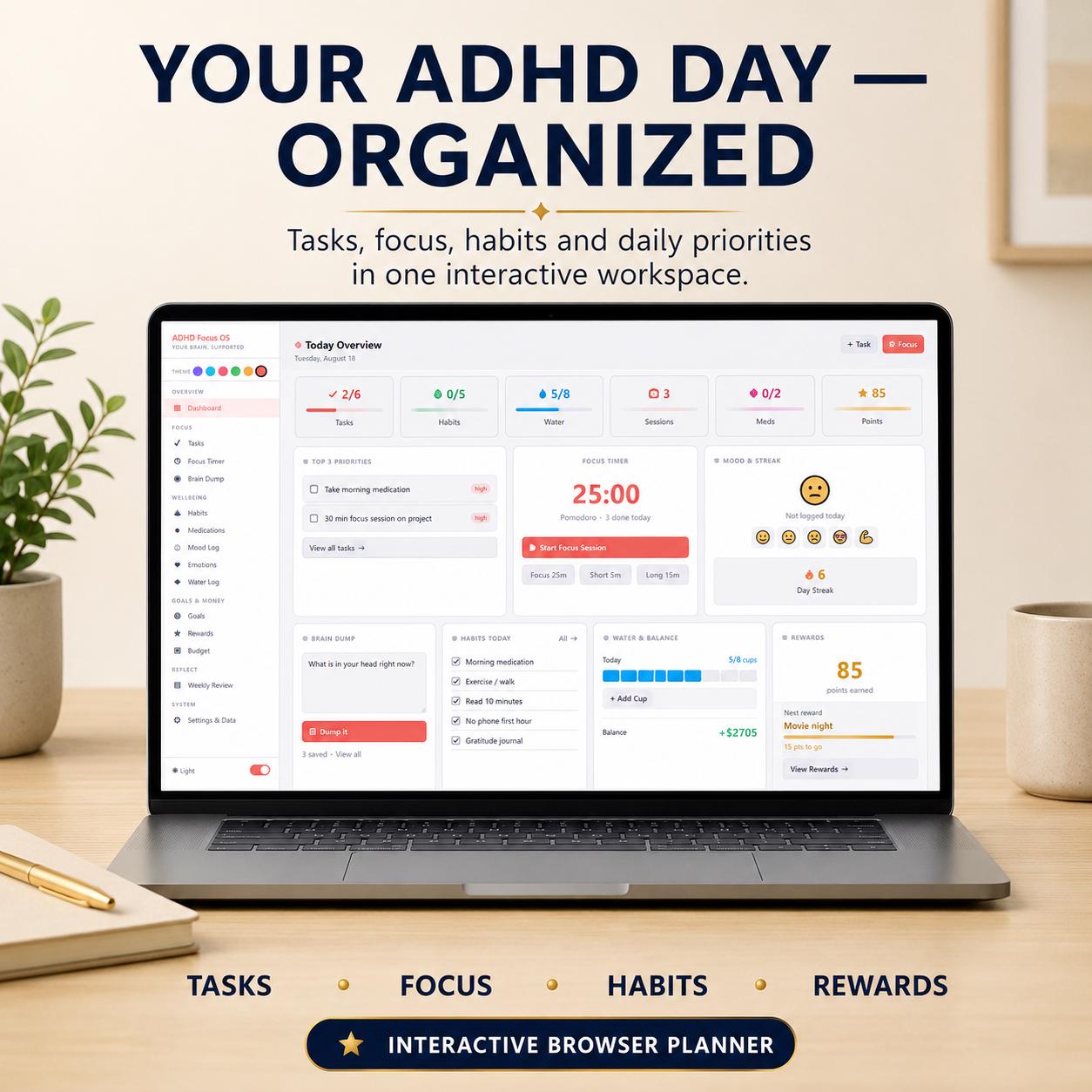
ADHD Focus OS brings tasks, focus sessions, habits, brain dumps, goals, rewards and personal tracking into one interactive browser workspace—without another subscription.
https://adhd-focus-os-demo.vercel.app
Explore the Dashboard and all 14 modules using realistic sample data. The demo is provided for product exploration. Saving, editing, completing activities, running the timer and other premium actions are limited in the demo version.
Purchase the full version to unlock the complete interactive workspace and use it locally with your own information.
No GoodNotes.
No Notion.
No spreadsheet.
No monthly subscription.
Download the file, open it in your browser and start planning.
────────────────────
ADHD Focus OS is an interactive digital productivity system delivered as a browser-based HTML file.
Instead of filling in static planner pages, you can interact with your workspace: complete tasks, run focus sessions, build habit streaks, track goals, log moods and emotions, earn reward points, capture brain dumps and review your week.
Your information saves locally in your browser. Built-in backup and restore tools help you protect your planner data and move it between supported browsers or devices when needed.
────────────────────
TODAY DASHBOARD
See your tasks, habits, water, focus sessions, medication status and reward points in one organized overview.
TASK MANAGER
Create tasks, assign High, Medium or Low priority and check them off as you complete them.
FOCUS TIMER
Use a working Pomodoro-style countdown timer with customizable focus, short-break and long-break durations.
BRAIN DUMP
Quickly capture thoughts, ideas, reminders and distractions so you do not have to keep everything in your head.
HABIT TRACKER
Build routines with an interactive seven-day habit grid and live streak tracking.
MEDICATION LOG
Keep a personal record of medication name, dose and time and mark entries as Taken or Pending.
MOOD LOG
Record how you are feeling with quick mood check-ins and optional notes.
EMOTION TRACKER
Log emotions, possible triggers and coping strategies for personal reflection.
WATER TRACKER
Track daily water intake visually and customize your daily cup goal.
GOALS
Create measurable goals, update your progress and see visual progress bars.
REWARDS & POINTS
Give your ADHD brain something motivating to work toward. Earn points by completing tasks, habits, focus sessions and goals, then create personal rewards.
BUDGET TRACKER
Record income and expenses and view your current running balance.
WEEKLY REVIEW
Reflect on your wins, challenges, lessons, self-care, gratitude and main focus for the following week.
THEMES & SETTINGS
Choose from six color palettes, switch between light and dark mode, customize focus-timer settings and manage your planner data.
────────────────────
Most digital ADHD planners are PDFs, annotation templates or spreadsheets.
ADHD Focus OS is interactive.
Your focus timer actually counts down.
Your completed tasks update automatically.
Your habit grid responds as you use it.
Your streaks are calculated for you.
Your reward points accumulate.
Your goals display real progress.
Your information saves as you use the planner.
It provides the experience of a lightweight productivity application without requiring another subscription account.
────────────────────
1. Purchase and download your digital files.
2. Read the included Customer User Guide.
3. Open the ADHD Focus OS HTML file in a modern browser.
4. Start adding your tasks, habits, goals and other information.
5. Your planner data saves locally in the browser you use.
6. Export a backup regularly using the built-in Backup feature.
7. Restore your backup when moving to another supported browser or device.
No complicated installation or technical setup is required.
────────────────────
OFFLINE & PRIVATE
After downloading the product, ADHD Focus OS is designed for local browser use without relying on a cloud account.
Your planner information is stored locally in your browser rather than being automatically sent to an online account.
No monthly subscription
No required account
No automatic cloud storage
Local browser storage
Offline use after download
Built-in backup and restore
Your planner data belongs to the specific browser, browser profile and device storage you use.
Opening the file in another browser or on another device will create a separate workspace unless you transfer a backup.
Clearing browser data may remove your locally stored information. Export backups regularly, especially before clearing browser data, changing browsers or moving to another device.
There is no automatic cloud synchronization between devices.
────────────────────
ADHD FOCUS OS INTERACTIVE PLANNER
One complete browser-based HTML file containing all 14 interactive modules.
CUSTOMER USER GUIDE
A professionally prepared guide covering setup, navigation, every included module, demo data, personalization, backup and restore, troubleshooting, frequently asked questions and data-safety guidance.
LIVE DEMO ACCESS
Explore the online demonstration before purchasing through the link provided at the beginning of this description.
This is a digital product. No physical item will be shipped.
────────────────────
An interactive browser-based planner
A digital productivity tool
Designed for use in a modern browser
Supplied with a detailed Customer User Guide
Designed for local and offline use after download
✗ A printable planner
✗ A PDF planner
✗ A GoodNotes template
✗ A Notability template
✗ A Notion template
✗ A Google Sheets spreadsheet
✗ An Excel spreadsheet
✗ An application from the Apple App Store or Google Play Store
────────────────────
Your thoughts, tasks and reminders feel scattered across different places
You have tried planners that looked attractive but were difficult to maintain
You want a working focus timer instead of a static timer worksheet
You need a quick place for brain dumps and distracting thoughts
You find streaks, progress bars and reward points motivating
You want tasks, habits, goals, mood check-ins and personal tracking together
You prefer a private local workspace without another subscription account
You want an interactive planner without using GoodNotes, Notion or a spreadsheet
ADHD Focus OS is designed as a personal organization and productivity tool.
────────────────────
FREQUENTLY ASKED QUESTIONS
Yes. Use the live demo link at the beginning of this description to explore the interface and all 14 included modules.
The demo uses sample data and is provided for product exploration. Saving, editing, completing activities, running the timer and other premium actions are limited in the demo version.
Yes. The demo is based on the ADHD Focus OS interface.
Purchasing provides the complete version for personal use, allowing you to use the interactive features and store your own information locally.
Yes. Your purchase includes a detailed Customer User Guide covering setup, navigation, features, demo data, personalization, backup and restore, troubleshooting and data safety.
No. ADHD Focus OS is an interactive HTML file that opens in a modern web browser.
No. GoodNotes, Notability and similar PDF annotation applications are not required.
No. This product is not a Notion template and does not require a Notion account.
No. Open the supplied HTML file in a compatible modern browser.
No. There is no recurring subscription required to use ADHD Focus OS.
Yes. The full product includes a working Pomodoro-style countdown timer with customizable focus and break durations.
Yes. The full planner stores your information locally in the browser you use.
No. ADHD Focus OS does not include automatic cloud synchronization.
Use the built-in backup and restore tools when moving your planner information between supported browsers or devices.
Your locally stored planner data may be removed.
Export a backup before clearing browser storage, changing browser profiles or making major browser or device changes.
You may use your purchased copy for your own personal use on your supported devices.
Your data will not sync automatically. Export a backup from one browser or device and restore it on the other when needed.
Yes. After downloading the HTML file, the full product is designed for local browser use without requiring a constant internet connection.
The product is designed for interactive browser use rather than as a printable planner.
No. The Medication Log is provided only as a personal organizational record.
ADHD Focus OS does not provide reminders, diagnosis, treatment, dosage guidance, medication recommendations or medical advice.
────────────────────
ADHD Focus OS is an organizational and productivity tool.
It is not a medical device and does not diagnose, treat, cure or prevent ADHD or any other health condition.
Medication, mood, emotion and water features are provided for personal tracking and organization only. They are not substitutes for professional medical or mental-health care.
The Budget Tracker is a simple personal organizational log and is not accounting, banking, tax or financial-advice software.
Please explore the live demo and carefully review the product format, compatibility and data-storage information before purchasing.
Digital product only. No physical item will be shipped.
MORE FROM CREATIFILE
Business · DIGITAL DOWNLOAD
Life & Planning · DIGITAL DOWNLOAD
Life & Planning · DIGITAL DOWNLOAD